Key learnings
IoT development with Raspberry Pi including custom Ubuntu Core image creation and snap-based deployment
Vue.js and Nuxt.js ecosystem including view transitions, internationalization, component architecture, and backend-less development with proxy-based data fetching and CORS management
User-centered design for constrained displays with focus on information density and readability
Description
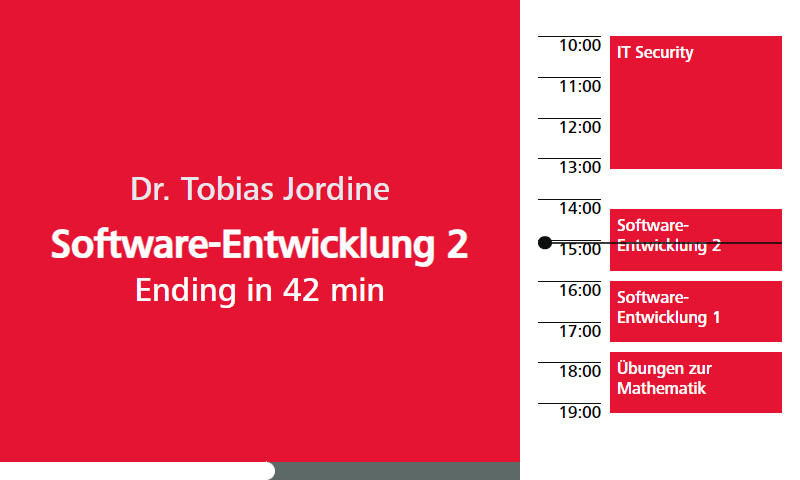
mplan updates the digital room information system at Stuttgart Media University using an IoT-powered display setup. It replaces legacy room displays with clean interfaces that display real-time event schedules, lecturer info, and room availability.
The architecture connects two main parts, a web application for administrative management and custom Raspberry Pi displays placed outside university rooms. Administrators can configure devices, manage room assignments, and connect external calendar feeds to specific displays.
The display units run a custom Ubuntu Core image built specifically for the Raspberry Pi hardware. This lightweight system pairs with a proxy setup to fetch live data without needing a heavy backend infrastructure.
Reflection
Working on mplan was an enriching experience that provided me with numerous learning opportunities. Although I was already familiar with the React/Next.js ecosystem, this project allowed me to dive deeply into the Vue/Nuxt.js ecosystem. This shift was a significant learning journey, especially within the IoT domain, where I developed a more nuanced understanding of working closely with hardware.
Upon joining the project, Tobias had already laid the groundwork with a prototype-like version of the mplan web app. My initial challenge was to get up to speed with the existing codebase and understand the interactions between various components. Despite the steep learning curve, I quickly adapted. In our small team of two, we collaborated closely and discussed each feature before implementation. Configuring the Ubuntu Core image for the Raspberry Pi was the hardest part, with sparse documentation and Ubuntu Core's own quirks to work around. Confirming whether an image would actually boot on the hardware meant a slow cycle of building a dummy image, flashing it, and checking whether the Pi came up, which stretched the setup phase out considerably.
Building a backend-less app that pulls data through a proxy also meant working through CORS issues directly instead of hiding them behind a server. On the display side, fitting real-time schedules and room info onto a 7-inch screen readably took more iteration on layout than I expected going in.
It's satisfying seeing the displays actually running in the hallways now, and hearing what students and lecturers think as they start relying on them day to day.