Key learnings
Android app architecture with Jetpack Compose, ViewModels, and a repository layer over Room
Working with platform APIs for location, camera, and runtime permissions
Room type converters and relations for persisting coordinates, categories, and image paths
Instrumented Compose UI tests alongside unit tests for the database converters
Keeping API keys out of version control with the secrets Gradle plugin
Description
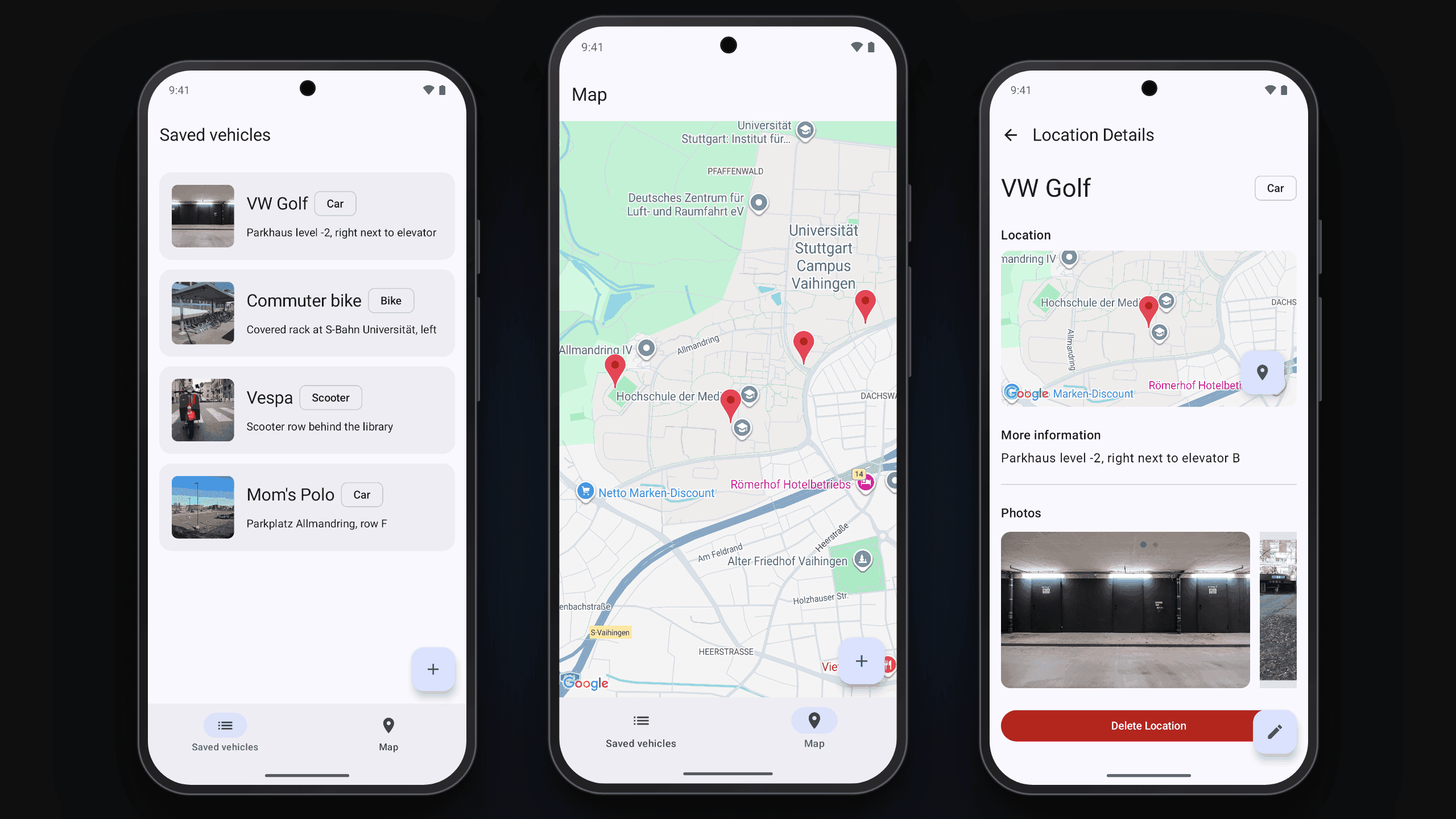
Vehicle Finder is an Android app that helps you get back to a vehicle you parked in a crowded place: a multi-storey car park, an underground garage, or a packed bike rack.
Saving a spot starts on a map that already points at your current GPS position. You can confirm it, tap somewhere else, or search for a place. Then you give the vehicle a name, a note like the level or the row, a type (car, bike, motorcycle, scooter, or other), and photos of the surroundings, taken with the camera or picked from the gallery. The vehicle then shows up in your list.
Saved vehicles appear either as a list or as pins on an interactive map, and each one can be opened in Google Maps for turn-by-turn navigation. The photos matter most exactly where the coordinates stop helping: underground, where the GPS fix is poor and one row of concrete pillars looks like every other one. They are stored on the device, so they are available without a connection, and open full screen with a tap.
Reflection
This was a two-person project built over one semester with Björn Godeck, and my first Android app of any real size. I set up the foundation (navigation, the Room database, the Google Maps integration) and then built most of the screens on top of it: the map, the list, the add and edit form with its location picker, and the detail view with its photo carousel and full-screen image viewer.
Coming from React, Jetpack Compose felt familiar in its declarative parts and unfamiliar everywhere else. The lesson that took longest to sink in was where state actually belongs. My first screens kept too much in the composables, and it only became maintainable once I moved everything behind ViewModels and a repository layer and applied that pattern consistently across all screens rather than per screen.
Two problems were more instructive than the feature work. The first was that photos silently disappeared after an app restart: I had been storing the content-provider URIs the picker handed back, which are temporary grants rather than durable references. Fixing it meant copying the image data into the app's own storage and persisting those paths instead. The second was persisting a LatLng in Room at all, which needs a type converter. The list of image paths needed one too, and the two converters became the natural place to start writing tests.
Testing was where the project stopped feeling like an exercise. I wrote unit tests for the converters and instrumented Compose tests that walk through creating and deleting a location, which caught more regressions than I expected for a codebase this small.
The last piece was less about code: the Maps SDK needs an API key, and a key committed to the manifest is a key you eventually leak. Wiring up the secrets Gradle plugin, keeping a checked-in defaults file, and writing setup instructions someone else could follow turned out to be the part of the project I have reused most since.